A P60 is the whole tax year on one page. Total pay, total tax, National Insurance, the final tax code. Lenders and landlords like it for exactly that reason. One document, twelve months of income.
Fraudsters like it for the same reason. Change one number and a year's salary goes up.
So here's what to check, whether you're lending, letting or hiring.
What is a P60?
It's the end of year certificate an employer gives to everyone on the payroll on 5 April. It has to be issued by 31 May, on paper or electronically. Someone with two jobs gets two, one from each employer.
Someone who left a job before 5 April doesn't get a P60 from that employer. They get a P45. So a P60 from a job the applicant says they left in January is a problem before you've read a single figure.
What should a P60 show?
The layout varies by payroll provider. The contents don't.
- Who it's for: The employee's name and National Insurance number, and often a payroll number.
- Who issued it: The employer's name, address and PAYE reference.
- Pay and tax: Totals for the year in this job. If they started mid-year, pay and tax from the previous job sit on their own line.
- The final tax code
- National Insurance: The category letter (A for most employees), the earnings it was worked out on and the contributions paid.
- The extras: Student loan deductions and statutory pay such as maternity or sick pay, where they apply.
The pay figure trips people up. It's taxable pay, so pension contributions and salary sacrifice have usually come off already. A P60 that's a bit lower than the salary in the contract is normal. One that's higher needs explaining.
What does P60 fraud look like?
Pay, mostly. The total goes up to support a bigger loan or a pricier flat.
We also see last year's P60 redated, a name swapped onto somebody else's, and P60s built from a template for an employer that doesn't exist. Templates are easy to find. HMRC publishes the layout so payroll software can print it.
Here's a sample P60 we edited ourselves and ran through Fraudfinder. We raised the pay by £20,000 and left the tax and National Insurance alone, which is how most of these edits are done.
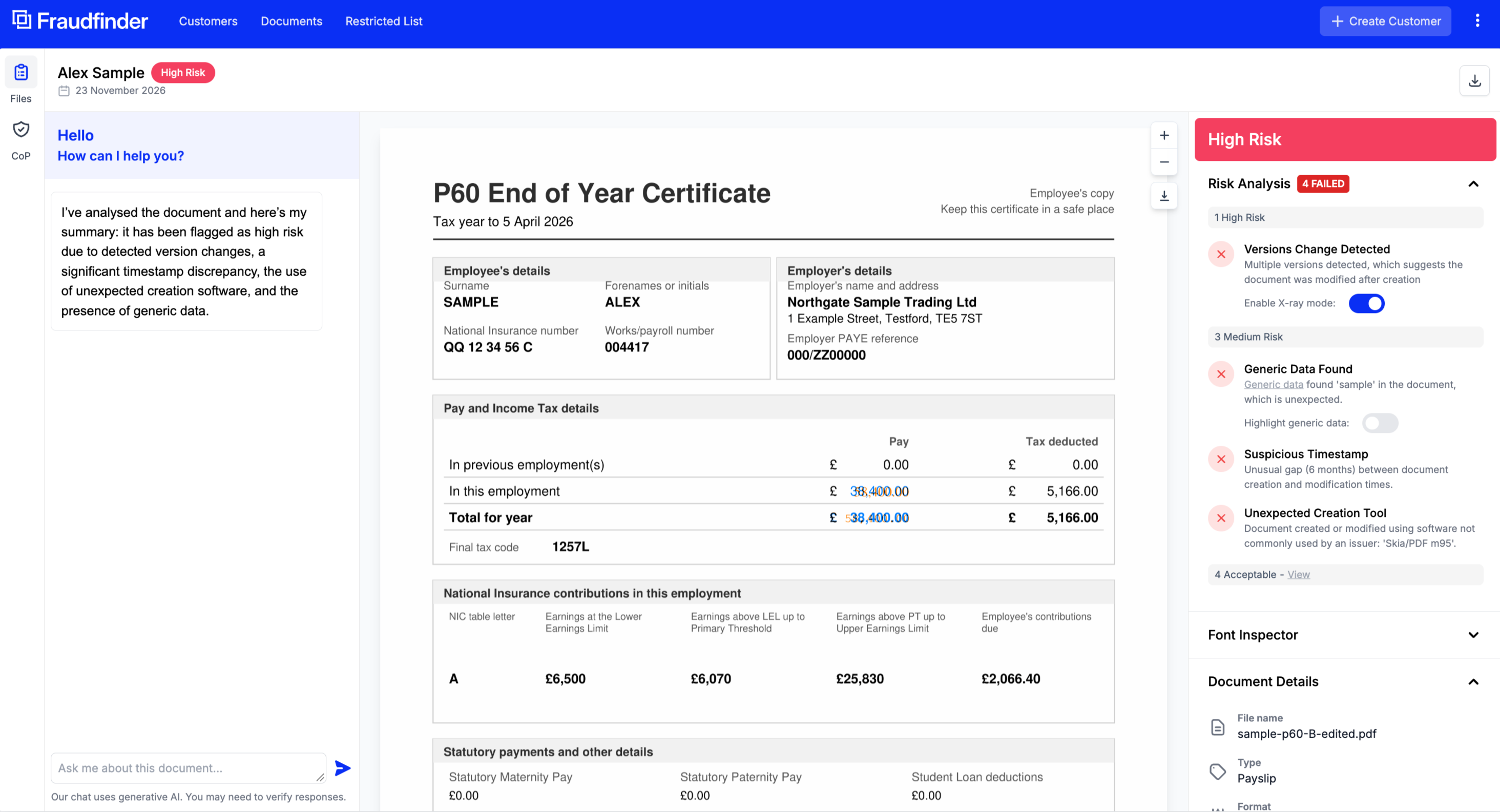
8 fake P60 warning signs you can check yourself
- Match it to the March payslip: The year-to-date taxable pay and tax on the final payslip of the tax year should equal the P60 totals. Exactly, not roughly.
- Redo the tax: Take the pay, knock off the personal allowance (£12,570 on a 1257L code), and tax the rest at 20%, 40% and 45%. You should land close to the tax shown.
- Check the National Insurance: The main employee rate has been 8% since April 2024. If the pay's gone up by £15,000 and the contributions haven't moved, the pay has been edited.
- Read the tax code: It should be the same code as the last payslip. An S at the front means a Scottish taxpayer, a C means Welsh.
- Check the National Insurance number: Two letters, six numbers, then a letter from A to D. Same on the P60 and every payslip.
- Check the dates: A P60 covers a tax year ending 5 April. The year in the heading should fit the job history you've been given. If you've got last year's P60 from the same employer, the employer details and National Insurance number should match, and the pay should have moved by a believable amount.
- Look up the employer: Find it on Companies House. The PAYE reference is three numbers, a slash, then a mix of letters and numbers, and it should match the payslips.
- Find the pay in the bank: Twelve months of net pay on the bank statements should add up to roughly the P60 pay minus the tax and National Insurance. Most payrolls pay on working days, so a salary credit dated a Sunday is worth a question.
None of these prove fraud on their own. Pension contributions, benefits and mid-year job changes all shift the numbers. They're reasons to ask.
And they'll only catch the rushed ones. Someone who's reworked every figure gets through all eight.
What should you ask for if a P60 looks wrong?
Three things, in this order.
- The original PDF: Most payroll portals let staff download their P60. A scan or a photo of one has far less to check.
- The payslips that go with it: The last three, including March. A P60 on its own is a summary. The payslips are the working.
- A look at HMRC's own record: More on that below.
A genuine applicant can get all three in ten minutes. If the employer made a mistake, payroll can issue a corrected P60 or a letter confirming the right figures.
What does Fraudfinder check on a P60?
- The tax maths: Whether the tax and National Insurance make sense for the pay.
- Layout: Whether the P60 is built the way that payroll provider builds them.
- Fonts and number formatting: A changed figure rarely matches the ones around it.
- Metadata: What made the file, when, and whether it's been changed since.
- Version history: Earlier versions still sitting inside the PDF.
- Hidden and removed content: Text that's been covered over, or deleted and replaced.
- AI generation: Whether the document was made or edited with an AI tool.
- Reuse: Whether the same P60, or the same details, has turned up on another application.
Every flag comes back with the reason marked on the document. We're not going to explain how each test works. That would help the wrong reader.
It runs in seconds as part of Fraudfinder's document fraud check.
Want to see a check run? Drag our edited bank statement into Fraudfinder and watch what it finds. Try it.
Can you verify a P60 with HMRC?
Not directly. HMRC won't confirm someone's P60 to a landlord, an employer or most lenders.
But HMRC holds the same figures, and the applicant can see them. Ask them to open the HMRC app or their personal tax account and show you their pay and tax for that year. HMRC's check your Income Tax for last year service shows it too. It comes from HMRC and not from a PDF.
If you ring the employer, use a number you found yourself. Never the one printed on the P60.
Found one? Check the rest
Fake documents travel in packs. In October 2026, when one document in an application had been tampered with, the others in the same application were around 16 times more likely to be tampered with too.
A raised P60 needs payslips and bank statements that agree with it. So go back through those. We've written up how to spot a fake payslip and how to spot a fake bank statement. For self-employed applicants, there's how to spot a fake SA302.
There's more on where income checks fit for consumer lenders, mortgage lenders, motor finance and landlords and tenant referencing.
Want to see it on real document fraud? Book a demo and we'll show you what we've caught, and what the report looks like.
Is it your own P60 that looks wrong?
That's a different problem. When the tax on someone's own P60 doesn't look right, the cause is often an umbrella or payroll company that hasn't passed on what it took from their pay. HMRC lists the signs of payroll company fraud, and your personal tax account shows what HMRC has received.
FAQs
Can a P60 be faked?
Yes. Most fake P60s are real ones with the pay changed. Others are built from a template around an employer that doesn't exist.
How can you tell if a P60 is fake?
Match the totals to the last payslip of the tax year, redo the tax and National Insurance, and check twelve months of pay on the bank statements. A careful edit won't show on the page, so the file needs checking too.
What should a P60 show?
The employee's name and National Insurance number, the employer's name and PAYE reference, total pay and tax for the year, National Insurance contributions and the final tax code.
When are P60s issued?
By 31 May, to everyone working for the employer on 5 April. Someone who left before then gets a P45 from that employer and no P60.
Why do lenders ask for a P60 as well as payslips?
Payslips show a month. A P60 shows the whole year, bonuses and unpaid months included, and its totals should agree with the payslips. Each one checks the other.
Can a P60 be issued after 31 May?
Yes. Employers can issue a replacement later if the original was lost or wrong. A late date isn't proof of anything on its own, but the totals should still match the payroll record.
What if a P60 has a mistake on it?
The employer's payroll team can issue a corrected P60, or a letter confirming the right figures. If they won't, the employee can raise it with HMRC.
Do you get a P60 for each job?
Yes. Each employer issues its own, so someone with two jobs on 5 April has two P60s for that year.
What's the difference between a P60, a P45 and a P11D?
A P60 is the end of year summary for someone still employed on 5 April. A P45 is what a leaver gets, with pay and tax up to their last day. A P11D lists benefits in kind such as a company car.
What if an applicant has lost their P60?
Their employer can issue a replacement. If not, the same pay and tax figures are in their personal tax account and the HMRC app.
Is it illegal to use a fake P60?
Yes. Using a fake or altered P60 to get credit, a tenancy or a job is fraud by false representation under the Fraud Act 2006.
Read next: how to spot fake documents and how to spot a fake utility bill.