A self-employed applicant can't hand you a payslip. So they hand you an SA302. It's the tax calculation HMRC produces from their Self Assessment return. For most lenders it's the proof of income.
Importantly, the applicant downloads it themselves, as a PDF, from their HMRC account or their accountant's software. And a PDF can be opened, changed and saved again in a couple of minutes.
So if you work in fraud or risk at a lender or a broker, and you see sole traders and company directors, this is what to look for.
What is an SA302?
It's HMRC's calculation of someone's income and the tax due on it for one tax year. It shows income by type (self-employment, dividends, employment, property), the allowances taken off, and the Income Tax and National Insurance that come out the other end.
For a sole trader it shows profit, not turnover. Someone who invoiced £80,000 and spent £25,000 running the business will have £55,000 on their SA302.
It usually travels with a second document, the tax year overview. That one shows the tax due for the year and what's been paid. Lenders tend to ask for both, covering the last two or three years.
Where does a real SA302 come from?
Two places:
- The applicant's HMRC online account: Available for the last four tax years, and only once 72 hours have passed since the return was sent.
- Commercial software: If an accountant filed the return through software, the calculation is printed from there. It's often headed "tax computation" and looks nothing like HMRC's version. That's normal.
The tax year overview only ever comes from the HMRC account, whichever way the return was filed. HMRC explains both routes in its SA302 guidance.
So a software calculation with an HMRC overview is a normal pair. A software-style calculation with no overview to back it up is worth a question.
What does SA302 fraud look like?
Income, nearly always. The profit figure goes up so the loan gets bigger.
We also see an old year rolled forward to look like the latest one, a name swapped onto somebody else's calculation, and calculations built from scratch for a business that barely trades.
And sometimes the SA302 is real but the return behind it isn't honest. Someone files an inflated return, downloads the calculation, then amends the return back down afterwards. The document's untouched. That's one for the tax year overview, which we'll come to.
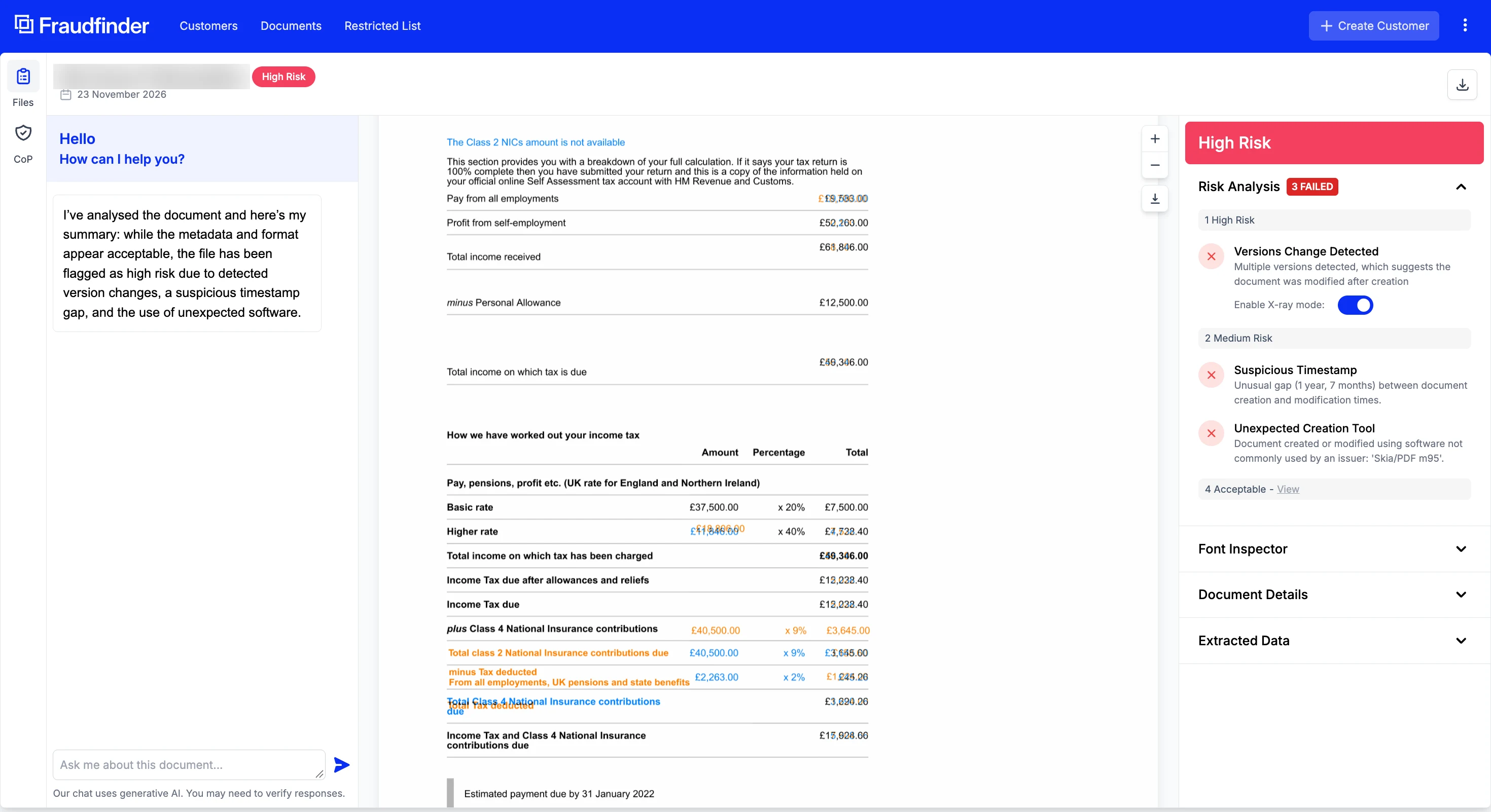
Here's one Fraudfinder caught. The overlapping figures are earlier versions still sitting inside the file, and they show what the applicant changed: the employment pay, the self-employment profit, and the tax and National Insurance lines that follow from them. The file was also last edited a year and seven months after it was created.
8 fake SA302 warning signs you can check yourself
- Match it to the tax year overview: The tax due on the SA302 should equal the tax figure on the overview for the same year. This is the single best check you have.
- Redo the tax: Take the total income, knock off the personal allowance (£12,570 for most people), and tax the rest at 20%, 40% and 45%. You should land close to the Income Tax shown. If the income's been raised and the tax hasn't, it won't.
- Look for National Insurance: A sole trader with decent profits pays Class 4 National Insurance on them. If it's missing, ask why.
- Check the tax year: It runs 6 April to 5 April. The year in the heading, the dates in the body and the year on the overview should all agree. And it should be one of the last four years, because that's as far back as HMRC's version goes.
- Check the UTR: The Unique Taxpayer Reference is ten digits. Same number on the SA302, the overview and every other year you've been sent.
- Compare the years: Profit that doubles in the year before a mortgage application isn't proof of anything. But it's a question.
- Find the money: The business account should show that level of income arriving, and payments to HMRC around the end of January and July. Remember the SA302 shows profit, so the money coming in should be higher than the figure on the page. A big profit and a quiet bank statement don't go together.
- Go to the source: Ask the applicant to log in to their HMRC account and show you the figures on screen. Or ring the accountant, on a number you found yourself.
None of these prove fraud on their own. Scottish taxpayers have different bands, and dividends and pension contributions move the sums around. They're reasons to ask.
Someone who's reworked the whole calculation may still evade a manual check that just goes through most of the list.
Why might an SA302 and tax year overview not match?
Usually because the return was amended after the SA302 was printed. The overview updates. The PDF in your inbox doesn't.
That can be innocent. Accountants correct returns all the time. It can also be the inflate-then-amend trick from earlier. Either way the fix is the same: ask for a fresh SA302 and overview, downloaded on the same day.
Don't be thrown by the balance on the overview. Payments on account and interest change what's still owed. They don't change the tax for the year, and that's the figure to compare.
What does Fraudfinder check on an SA302?
The same things we check on every document, tuned to how these ones are built.
- The tax maths: Whether the income, allowances, tax and National Insurance all reconcile.
- Layout: Whether the document is built the way HMRC, or that accounting software, builds them.
- Fonts and number formatting: A changed figure rarely matches its neighbours exactly.
- Metadata: What made the file, when, and whether it's been changed since.
- Version history: Earlier versions that are still sitting inside the PDF.
- Hidden and removed content: Text that's been covered over, or deleted and replaced.
- AI generation: Whether the document was made or edited with an AI tool.
- Reuse: Whether the same calculation has turned up on another application.
Every flag comes back with the reason marked on the document. We won't explain how each test works, for obvious reasons.
It runs in seconds as part of Fraudfinder's document fraud check.
Want to see a check run? Drag our edited bank statement into Fraudfinder and watch what it finds. Try it.
Can you verify an SA302 with HMRC?
Not routinely. HMRC won't confirm an individual's SA302 to a lender on request. Mortgage lenders can refer a suspected case through HMRC's Mortgage Verification Scheme, but that's for applications you already doubt.
So you verify it from the side. The tax year overview, the bank statements, the accountant, and the applicant's own HMRC login.
Found one? Check the rest
Fake documents travel in packs. In October 2026, when one document in an application had been tampered with, the others in the same application were around 16 times more likely to be tampered with too.
It makes sense. Raise the profit on the SA302 and the bank statements have to show it arriving. So they get edited as well. There's a walkthrough for those in how to spot a fake bank statement.
There's more on where income checks fit for mortgage lenders, business finance and bridging.
Want to see it on real document fraud? Book a demo and we'll show you what we've caught, and what the report looks like.
FAQs
Can an SA302 be faked?
Yes. It's a PDF the applicant downloads themselves, so it can be edited like any other. Most fakes are real calculations with the income changed.
How do you check an SA302 is genuine?
Match the tax due to the tax year overview for the same year, redo the tax sum, and check the income against the bank statements. Then have the file itself checked, because a careful edit won't show on the page.
What's the difference between an SA302 and a tax year overview?
The SA302 is the calculation: income, allowances and the tax due. The tax year overview shows the tax due for the year and what's been paid. Lenders usually ask for both because each one checks the other.
Does an SA302 show turnover or profit?
Profit. For a sole trader it's what's left after business expenses, which is why the figure is lower than the money that came into the account.
How many years of SA302s do lenders ask for?
Usually two or three. HMRC's online version only goes back four tax years, so anything older has to come from the accountant.
How soon after filing can someone get their SA302?
HMRC makes it available 72 hours after the return is sent. Before that there's nothing to print.
Do lenders accept an SA302 printed at home?
Most do. HMRC publishes a list of lenders that accept SA302s printed from an online account or from commercial software. That's convenient. It's also why the file needs checking.
Is it illegal to use a fake SA302?
Yes. Using a fake or altered SA302 to get a mortgage or any other credit is fraud by false representation under the Fraud Act 2006.
Read next: how to spot a fake payslip, how to spot a fake P60 and how to spot fake documents.